PlanReply guides
How to review floor plans online with clients
A floor-plan review works best when everyone can point to the same detail. Instead of collecting disconnected screenshots and email replies, share one PDF review and keep questions alongside the drawing.
This workflow is useful for architects and designers gathering client feedback on a layout. PlanReply lets reviewers highlight selectable text, mark an area, sketch a suggestion, and discuss each annotation in a thread.
1. Prepare the drawing for review
Export the floor plan as a PDF under 50 MB. Include the drawing revision, room labels, and relevant dimensions so reviewers know what they are looking at. Choose one revision for the discussion and tell your clients which decisions you need from them.
For example: “Please review the kitchen opening and the position of the study door.” A focused question is easier to answer than “Any thoughts?”
2. Upload your PDF and share the review
On the homepage, choose your PDF or drag it onto the upload area. Leave encryption enabled and enter a display name. When the review opens, use Share link and send that complete link to your clients. They can join in their browser with a display name; no account or installation is required.
The full link grants access to an encrypted review. Send it only to intended reviewers. Read how private sharing works before sharing sensitive drawings.
3. Attach feedback to the exact detail
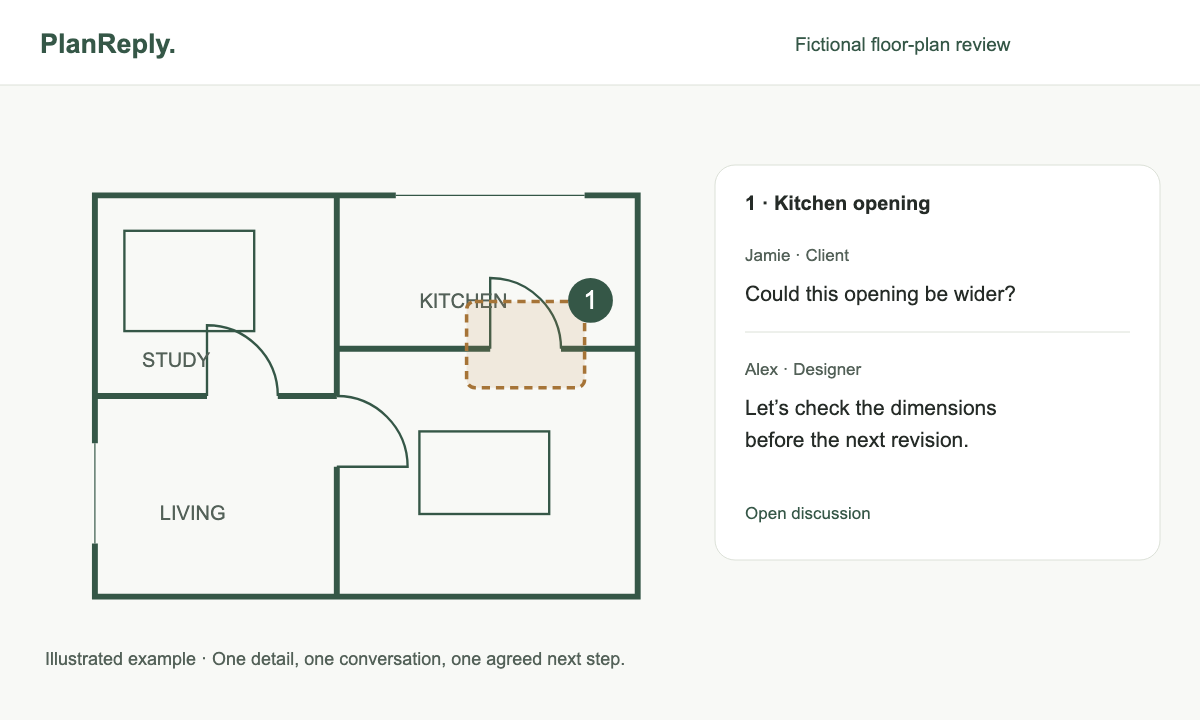
Use Highlight for selectable drawing notes or specification text: select the words, then choose Highlight selection. For a scanned plan or a spatial question, use Rectangle to identify an area or Pen to sketch a suggestion.
Keep one question in each thread. “Could this opening be wider?” attached to the kitchen entrance gives the designer a clear place to respond. A markup communicates intent; confirm dimensions and feasibility in your design workflow.
4. Discuss changes together or return later
Annotations and comments update in real time. You can review together on a call or let clients add feedback later using the same link. Reply in the existing thread so the question, response, and agreed next step stay in one place.
5. Resolve feedback when a decision is made
Write the agreed next step in the thread before resolving it. Filter for open conversations to find remaining decisions, and reopen a discussion if the brief changes. Resolving a comment records progress in the review; it does not edit the source drawing.
A short checklist before the next revision
- Have all reviewers used the same drawing revision?
- Does each requested change identify a specific location?
- Are the agreed decisions recorded in their threads?
- Have unresolved questions been assigned a next step outside the review?